Safety Bollards
Identify exposed corners and equipment, then confirm mounting and clearance. Final selection depends on the documented site conditions and the supplying manufacturer’s configuration.
Add to bay brief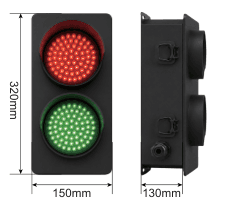
Where to consider this arrangement
Identify exposed corners and equipment, then confirm mounting and clearance.
- Confirm vehicle rear geometry.
- Confirm mounting positions and foundations.
- Confirm signals and control interfaces.
When to review alternatives
Do not select this arrangement if the required working space, mounting conditions or operating envelope cannot be demonstrated. Existing equipment and civil works must be measured before a replacement is proposed.
Vehicle RestraintDock BumpersDock Traffic Lights & Loading LightsWhere should proposed bollard positions be shown?
Mark exposed corners or equipment on a site plan and show vehicle and pedestrian clearances. Ask for mounting details and the specified protection requirement to be reviewed before ordering.
Proposed positions on site plan
Clearances and traffic routes
Mounting and protection requirements
Specifications and configuration
| Item | Project record |
|---|---|
| Product reference | JD-2016 |
| Vehicle rear geometry | Confirmed per project |
| Mounting positions and foundations | Confirmed per project |
| Signals and control interfaces | Confirmed per project |
| Dimensioned drawing | Available on request — confirmed per project |
Source: JBL Dock Catalogue V1.2 (review edition) and website planning framework. Content reviewed for this draft: 17 October 2026. Technical values and configuration require project confirmation.
The catalogue reference table below distinguishes review values from unresolved entries. These are not approved order specifications. No certification or universal compatibility is claimed.
Catalogue configuration reference
Review data—not an approved order specification. The entries below are transcribed from Catalogue V1.2 and remain subject to technical confirmation.
JD-2016 · JD-2301–JD-2318, accessory family · Catalogue pages 25–27
| Parameter | Review catalogue entry | What to confirm |
|---|---|---|
| Signals / loading light | JD-2301 / JD-2302 | Confirm voltage, controls and exact light specification. |
| Guides / bollard | JD-2303–JD-2305 / JD-2306 | Confirm geometry and mounting. |
| Bumpers | JD-2307–JD-2318 | Confirm material, backing plate and fixing interface. |
Open technical items: Accessory family images are not an inclusive package. Explosion-protection claims lack evidence and the guide-rail Direction column is ambiguous. Individual availability requires confirmation.
What should be checked?
Agree the inspection scope with the supplying manufacturer before order. Relevant checks include dimensions against the approved drawing, component identity, mounting details, visible condition, applicable functional checks, marking and packing.
Inspection records to agreeWhat configuration is required?
Describe the operating sequence and site constraints. Confirm materials, finish, electrical requirements and control interfaces where applicable. Options shown in reference illustrations are not automatically included in the order.
Know what your quotation includes
Compare the same equipment and installation scope. Ask for an itemised offer showing the selected configuration, included items and exclusions.
No universal standard package is confirmed in this review. Agree the following scope before comparing prices.
| Scope to identify | Written confirmation to request |
|---|---|
| Restraint, alignment, impact protection or signalling function | Exact model, construction and drawing revision. |
| Mounting geometry, foundations and cables where relevant | Included equipment, separately priced options and excluded site work. |
| Vehicle compatibility and operating sequence | Interfaces, responsibilities and required documentation. |
A simpler way to request a comparable quotation
Start with a short description or photo. Add the following when available; mark anything unknown so it can be resolved together.
| Share with your enquiry | What this helps clarify |
|---|---|
| Proposed positions on site plan | Equipment fit and selection |
| Clearances and traffic routes | Installation and interface requirements |
| Mounting and protection requirements | The configuration to review |
| Quantity, location and preferred schedule | Supply and delivery planning; dates require confirmation. |
| Existing or new installation | Existing structures and equipment to measure and review. |
| Required documents and inspection records | Acceptance evidence and responsibilities before order. |
Keep the product information together
Catalogue V1.2 · Pages 25–27 · JD-2301–JD-2318, accessory family. Review edition: final configuration and technical details require confirmation.
Information we need for a project review
Proposed positions on site plan
Clearances and traffic routes
Mounting and protection requirements
Quantity and installation location
Target delivery date
Drawings and current equipment photographs
Components and replacement enquiries
Identify the installed equipment before requesting a component. Include nameplate details, overall photographs, interface close-ups and measurements. Replacement availability and compatibility are confirmed for the individual request.
Prepare a parts requestRead before you specify
Dock leveler pits and embedded parts: what to confirm
Use the approved drawing for the selected leveler to define pit and embedded-part requirements. Measure existing pits and resolve differences before ordering equipment or starting civil works.
Dock shelter vs dock seal: selection questions
A foam dock seal uses compressible pads at the vehicle interface, while shelter arrangements use curtains or inflatable elements around the opening. Compare the vehicle fleet, contact geometry and operating conditions before choosing.
Dock leveler spare parts: what to send for identification
Start a dock spare parts enquiry with the equipment nameplate, a view of the complete assembly and close-up photos of the component. Include known dimensions and the required quantity. Appearance alone cannot confirm compatibility.
Questions before you specify
Where should proposed bollard positions be shown?
Mark exposed corners or equipment on a site plan and show vehicle and pedestrian clearances. Ask for mounting details and the specified protection requirement to be reviewed before ordering.
Is JD-2016 a complete order specification?
A product-family reference is not a complete order specification. Record dimensions, load conditions, controls, installation interfaces and the agreed supplier configuration in the project documents before ordering.
Can I use an existing pit or mounting position?
Existing interfaces need to be measured and checked against the selected equipment drawing. Do not assume that similar equipment has the same fixing, clearance or structural requirements.
What if I do not have all the dimensions?
Start with site photographs and any available drawings. Leave unknown values blank in the project brief and identify them for confirmation. A dimensioned drawing and site verification are needed before final selection.
Explore loading bay applications
Planning paths to review, with suitability confirmed against the actual site.