Vehicle restraints, wheel chocks and dock bumpers: what is the difference?
JBL Dock · Loading dock guidesEditorial draft · Updated 18 October 2026
Practical selection and project-planning information. Final equipment details require project confirmation.
Product illustrations · Illustrative reference, not a completed JBL Dock project.
A loading bay may need several protective devices, but their names are sometimes used as if they solve the same problem. Start by defining the function and compatibility of each proposed item.
Short answer
These devices address different interfaces. A vehicle restraint requires compatibility with its specified vehicle engagement arrangement; a wheel chock acts at a wheel; a dock bumper provides a contact interface at the dock face. They are not automatically interchangeable. Selection and operating procedures require a site-specific safety review.
Describe the vehicles before selecting equipment
Provide the vehicle types and rear geometry, including the impact guard where a hook-style restraint is being considered. Record vehicles that differ from the regular fleet. A device cannot be selected just because a photograph resembles the installed arrangement. Compatibility needs confirmation for the actual operating range.
Keep the functions separate
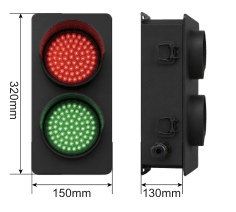
Positioning guidance, impact contact, vehicle restraint and operator communication are distinct functions. A bumper does not establish that a trailer is restrained; a traffic light indicates a defined signal and does not itself secure a vehicle. Ask the responsible safety and technical teams how these functions form the proposed operating arrangement.
Review mounting and controls together
Show the dock face, foundations, bumper projection and proposed restraint position on the same interface drawing. Define how equipment status is detected, communicated and used in the control sequence. Interlock claims need confirmation for the supplied controls; they should not be assumed from the product family name.
Identify exceptions and responsibilities
Ask how the site will handle vehicles outside the confirmed compatibility range and abnormal equipment status. The appropriate qualified team should define the procedure using the selected equipment instructions and site risk assessment. This article is not an operating procedure or a substitute for that assessment.
Prepare a focused enquiry
Start with vehicle photographs taken safely, rear dimensions where known, dock-face photographs and the current procedure. Explain whether you need a new arrangement, replacement components or a compatibility review. Availability of individual accessories and control functions must be confirmed separately.
Functions to keep separate
Compare / record
Information to review
Decision or confirmation
Hook-style restraint
Engages a compatible vehicle rear interface
Confirm geometry, operating range and mounting.
Wheel chock
Acts at a wheel under a defined procedure
Confirm the actual product and site application.
Dock bumper
Provides the specified dock-face contact
Does not establish vehicle restraint.
Wheel guide
Helps define the approach path
Does not replace a restraint arrangement.
Signal or alarm
Communicates a defined status or condition
Does not itself secure a vehicle.
Supplier equipment reference. Illustrates the product family; not an approved installation drawing or a completed JBL Dock project.
Before you confirm the selection
The JD-2009 review source includes unresolved operating-description and response-time details, and a certification claim without supporting evidence. Confirm the exact restraint and controls. Wheel chocks shown as an enquiry category are not automatically included with guide rails or JD-2016 accessories.
Catalogue basis: JBL Dock Loading Dock Equipment Catalogue V1.2, review edition, pages 16–17, 25–27. Unresolved source entries are not approved specifications.
Can a bumper replace a vehicle restraint?
No. They have different functions. The site safety review must establish the complete arrangement and procedure.
Start with the information you have.
Share your question, site photos or equipment details. Mark anything you have not yet measured — you can begin without a complete specification.
Source basis: JBL Dock Catalogue V1.2 review edition and the website planning framework. Product selection, installation and maintenance must follow the applicable equipment documents and project review. This guide does not establish certified performance or final dimensions.
Tell me what you would like to build, replace or improve—even if you are not sure which equipment you need. A short message or a photo is a good place to start.
I can help you clarify your requirements and identify the details to check, so you can compare options with a clearer understanding. You do not need a complete drawing or specification to get in touch.